
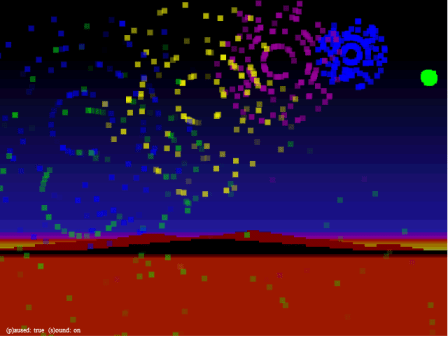
For the 4th of July, here is an Atari 2600 inspired fireworks demo in HTML5. Click the mouse button to explode a firework shell. This demo was originally designed to test our particle FX engine for the HTML Canvas with an object pool.
While I don’t have enough time this morning to go through all the code, here is a quick run-down on what is going on.
In JavaScript we create an instance of our custom ParticleExplosionManager class : (requires the canvas context as it’s parameter).
var particleManager = new ParticleExplosionManager(context);
Then we listen listen for a “mousedown” event,
theCanvas.addEventListener("mouseup",onMouseUp, false);
and then creates three particle explosions inside of one another to get a full bursting firework effect.
 var rndColor = Math.floor(Math.random()*blockHTMLColors.length);
 var rndParts = Math.floor(Math.random()*30) + 40;
 particleManager.createExplosion(mouseX,mouseY,blockHTMLColors[rndColor], rndParts,8,8,6,.5,40);
 particleManager.createExplosion(mouseX,mouseY,blockHTMLColors[rndColor], rndParts,8,8,4,.5,40);
 particleManager.createExplosion(mouseX,mouseY,blockHTMLColors[rndColor], rndParts/2,8,8,2,.5,40);
Each explosion is a series of individual particles. To make them move, we call the PartcleExplosionManager’s draw() function inside the draw function of our main Canvas JavaScript app.
function  draw () {

   ...
   particleManager.draw();
   ...

}
The main piece of code used for this is our JavaScript ParticleExplosionManager class.
When an explosion is created, each particle is created individually and stored as dynamic object.
this.createExplosion = function(x,y,color,number,width, height, spd, grav, lif) {
		for (var i =0;i < number;i++) {
                     var angle = Math.floor(Math.random()*360);
                     var speed = Math.floor(Math.random()*spd/2) + spd;
                     var life = Math.floor(Math.random()*lif)+lif/2;
                     var radians = angle * Math.PI/ 180;
                     var xunits = Math.cos(radians) * speed;
                     var yunits = Math.sin(radians) * speed;
                     if (particlePool.length > 0) {
				var tempParticle = particlePool.pop();
				tempParticle.x = x;
				tempParticle.y = y;
				tempParticle.xunits = xunits;
				tempParticle.yunits = yunits;
				tempParticle.life = life;
				tempParticle.color = color;
				tempParticle.width = width;
				tempParticle.height = height;
				tempParticle.gravity = grav;
				tempParticle.moves = 0;
				tempParticle.alpha = 1;
				tempParticle.maxLife = life;
				particles.push(tempParticle);
			} else {
				particles.push({x:x,y:y,xunits:xunits,yunits:yunits,life:life,color:color,width:width,height:height,gravity:grav,moves:0,alpha:1, maxLife:life});
			}

		}
	}
When the explosion is drawn, if there is a particle in the pool, it will use that object instead of making a new one. Particles at the end of their life are placed into the pool. We’ve set a maximum pool size at 100, so if the pool is filled, we just splice the particle out and hope for the best.
this.draw = function() {
   for (var i=particles.length-1; i>= 0;i--) {
      particles[i].moves++;
      particles[i].x += particles[i].xunits;
      particles[i].y += particles[i].yunits + (particles[i].gravity * particles[i].moves);
      particles[i].life--;

      if (particles[i].life <= 0 ) {
         if (particlePool.length < MAX_POOL_SIZE) {
             particlePool.push(particles.splice(i,1));
         } else {
             particles.splice(i,1);
         }
      } else {
         context.globalAlpha = (particles[i].life)/(particles[i].maxLife);
         context.fillStyle = particles[i].color;
         context.fillRect(particles[i].x,particles[i].y,particles[i].width , particles[i].height);
         context.globalAlpha = 1;
      }

    }
 }
You can test it out here http://www.8bitrocket.com/html5canvas/fireworks/fireworks.html (click the mouse on the Canvas to create the explosions)
 intotheverticalblank.com
Leave a comment